











6. SupportWIFIWireless connection 7. Support Ford Mazda vehicles from year 2005 - 2022, F series after 2010. 8. Operating system: Windows 10 Pro, 32bit and 64bit 9. Can be used asJ2534 Passthrufor Forscan, FJDS, FDRS and MDARS. Some New models after 2020 need to use FDRS and MDARS.
Requirement on computer:
1. Computer has at least 8GB Memory 2. Computer need produced after 2000 year, too old computer can not run the software. 3. Make sure there is no other Software installed on the computer, Ford IDS and Mazda IDS need to install on separate windows systems. 4. Only firmware update with vx manager but not VCI Ford manager. Wrong firmware update will kill the vxdiag device.
Free Download IDS software for VXDIAG
VXDiag VCX Nano Description:
VXDiag VCX NANO is an OEM diagnostic interface for the vehicles of Ford and Mazda. It can be compatible with OEM software of Ford IDS and Mazda IDS
VXDiag VCX Nano Scanner Function: (Programming & Special Service functions require original online account)
1. Programming & Installation of new ECUs ( PCM, ABS, Instrument Cluster, Air Bag, Fuel Pumps, etc. )
2. Live Data-stream with Recording & Playback Functions for Main ECUs
3. Read & Clear Diagnostic Trouble Codes ( DTCs )
4. Set, Adjust or Remove Speed Governors
5. Automatic vehicle recognition
6. New Software Re-flash for Existing ECUs
7. All Other Dealer Functions
8. Steering Angle Resets
9. Guided Fault Finding
10. Program New Keys
11. DPF Regeneration
12. Brake Bleeding
13. Injector Coding
Ford IDS Installation Instruction
1. Install Ford IDS-1** 2. Wait for the installation of Ford IDS &nD-A-Sh; 1**, and restart the computer 3. Install the Ford original VCI software_ 1.0.0.10.exe 4. Install VX manager and IDS driver on VX manager "Diagnostic" Menu 5. Wait for VX manager and IDS driver installation to complete 6. Connect VCX device and install idspatch 7. Use idspatch to open IDs and start diagnosis.
Mazda IDS Installation Instruction
1. Install mazdaids-1** 2. Wait for mazdaids &nD-A-Sh; 1** installation to complete and restart the computer 3. Install VX manager and IDS driver on VX manager "Diagnostic" Menu 4. Wait for VX manager and IDS driver installation to complete 5. Connect VCX device and install idspatch 6. Use idspatch to open IDs and start diagnosis.
Functions tested successfully:
Record and play back live data for ABS, PCM…tested ok
Program and Install new ECUs (PCM, ABS)…tested ok
Read and Clear DTCs…tested ok
Program New Keys for Mazda 6…tested ok
Set, adjust or remove speed governors…tested ok
DPF Regeneration…tested ok
Automatic vehicle recognition…tested ok
All other dealer functions…tested ok
Reset steering angle…tested ok
Find guided fault…tested ok
Injector Coding…tested ok
Note: Does not support Ford F-series pre-2010 light-duty and super duty.
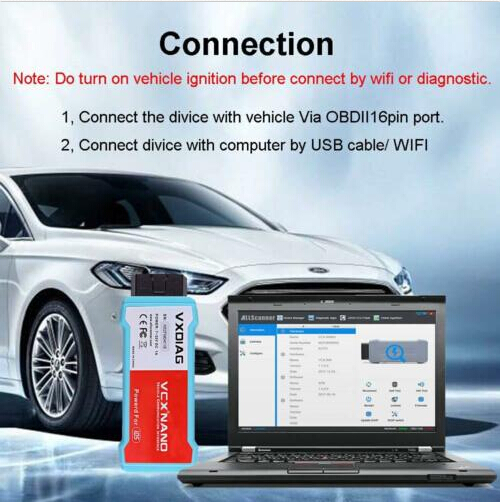
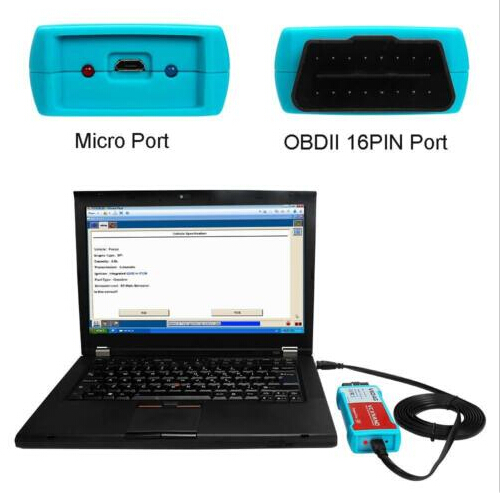
VXDIAG VCX NANO Ford / Mazda Scan Tool WiFi version connection:
Package List:
1pc x VXDiag VCX NANO Ford Mazda Scanner Main Unit WIFI version
1pc x USB Cable
1pc x Carry Case
We are dedicated to providing excellent support and assistance. If you have any questions, concerns, or inquiries, please don't hesitate to reach out to us. Our team is here to help! Email:info@todiag.com Whatsapp:+86-15889387385 Skype:ssss.hong Live Chat:Visit our website and click on the live chat option to chat with Oliver Liu in real-time.